
 Ampandheaust
d4e8634f67
Ampandheaust
d4e8634f67
Amp-Thread-ID: https://ampcode.com/threads/T-019f9d91-77c1-7206-a60f-ed6554ce92ab

Co-authored-by: Heaust Azure <heaust.azure@gmail.com>
fxnode
Internal private 0.x prerelease. This package has
private: true; its API and data formats may change.
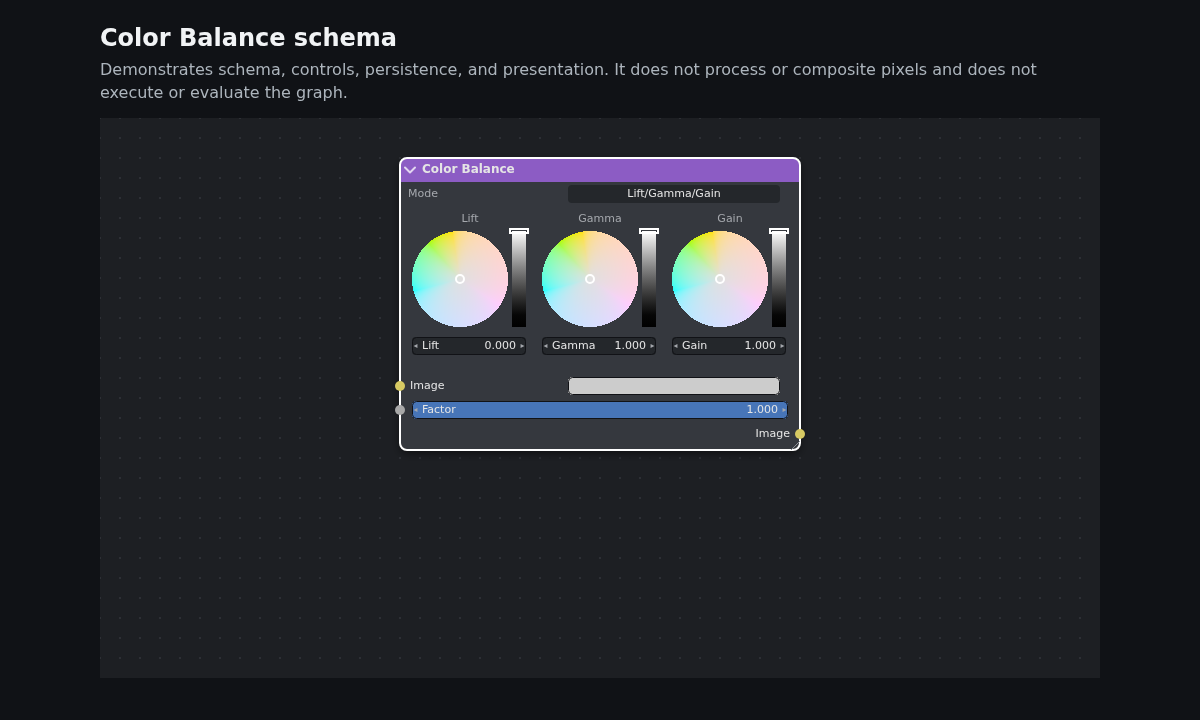
The Color Balance example rendered by fxnode. It demonstrates editor presentation only; fxnode does not process pixels.
fxnode is a typed, worker-owned node editor for application-defined nodes, sockets, styles, resources, and migrations. One root can run headlessly or attach multiple independent canvas views to the same graph and worker. The application explicitly owns its DOM integration: canvas sizing, input forwarding, menus, file pickers, accessibility, lifecycle, and cleanup. The worker owns graph state, validation, history, hit testing, layout, and frame generation; the browser client presents transferred frames without keeping a shadow graph.
fxnode edits and presents graphs. It does not execute or evaluate graphs and contains no image-processing engine. It does not read or write Blender files, and makes no Blender compatibility, affiliation, endorsement, or parity claim.
Install and platform requirements
npm install fxnode
That command is for a future registry release; this repository is currently private and not publishable.
Consumers need a modern browser with module workers, Canvas 2D, and worker-side OffscreenCanvas/ImageBitmap support.
See the committed browser support matrix and
Content Security Policy guide before integrating.
The simplest node
Definitions are serializable, consumer-facing tuples. This complete definition matches the executable minimal definition:
import type { FxNodeDefinition, FxNodeSocketTypeDefinition, FxNodeStyleDefinition } from "fxnode";

export const numberSocket = [
  "number",
  { title: "Number", color: "#a8a8a8", acceptsFrom: ["number"] },
] as const satisfies readonly [string, FxNodeSocketTypeDefinition];

export const minimalStyles = {
  value: { header: "#4c6ef5" },
} as const satisfies Readonly<Record<string, FxNodeStyleDefinition>>;

export const valueNode = [
  "example.minimal.value",
  {
    version: 1,
    title: "Number Value",
    behavior: "standard",
    style: "value",
    parameters: {
      value: { type: "number", default: { kind: "number", value: 42 }, step: 1 },
    },
    sockets: {
      value: {
        title: "Value",
        direction: "output",
        type: "number",
        maxIncomingLinks: 0,
        visible: true,
        value: null,
        showValue: false,
      },
    },
    ui: [
      { kind: "parameter", parameter: "value" },
      { kind: "socket", socket: "value" },
    ],
    muteBypass: [],
    migrations: [],
  },
] as const satisfies readonly [string, FxNodeDefinition];
Bootstrap the editor after creating an application-local host and theme:
import { createFxNode } from "fxnode";
import { prepareFxNodeBrowserHost } from "./browser-host.js";
import { exampleTheme } from "./theme.js";
import { minimalStyles, numberSocket, valueNode } from "./definition.js";

const canvas = document.querySelector<HTMLCanvasElement>("#graph")!;
const host = prepareFxNodeBrowserHost({ canvas });
let cleaned = false;
let api: Awaited<ReturnType<typeof createFxNode>> | null = null;
let view: Awaited<ReturnType<Awaited<ReturnType<typeof createFxNode>>["attachView"]>> | null = null;
function cleanup() {
  window.removeEventListener("pagehide", cleanup);
  cleaned = true;
  const root = api;
  api = null;
  host.destroy();
  const destroyRoot = () => root?.destroy();
  if (view) void view.detach().then(destroyRoot, destroyRoot);
  else destroyRoot();
  view = null;
}
window.addEventListener("pagehide", cleanup);
try {
  const created = await createFxNode({
    applicationId: "fxnode.example.minimal",
    applicationVersion: 1,
    resources: {},
  });
  if (cleaned) created.destroy();
  else {
    api = created;
    await api.setTheme(exampleTheme);
    await api.setHeaderStyles(minimalStyles);
    await api.composeSocket(...numberSocket);
    await api.composeNode(...valueNode);
    await api.setState({ graphId: "minimal", catalogVersion: 1, nodes: [], links: [], metadata: {} });
    view = await api.attachView({ canvas, viewport: host.initialViewport });
    host.attach(api, view);
    await view.addNode({ nodeId: "value", typeId: valueNode[0], viewPosition: { x: 360, y: 190 } });
    await view.whenRendered();
  }
} catch (error) {
  cleanup();
  throw error;
}
exampleTheme and prepareFxNodeBrowserHost are application-local examples, not fxnode package exports.
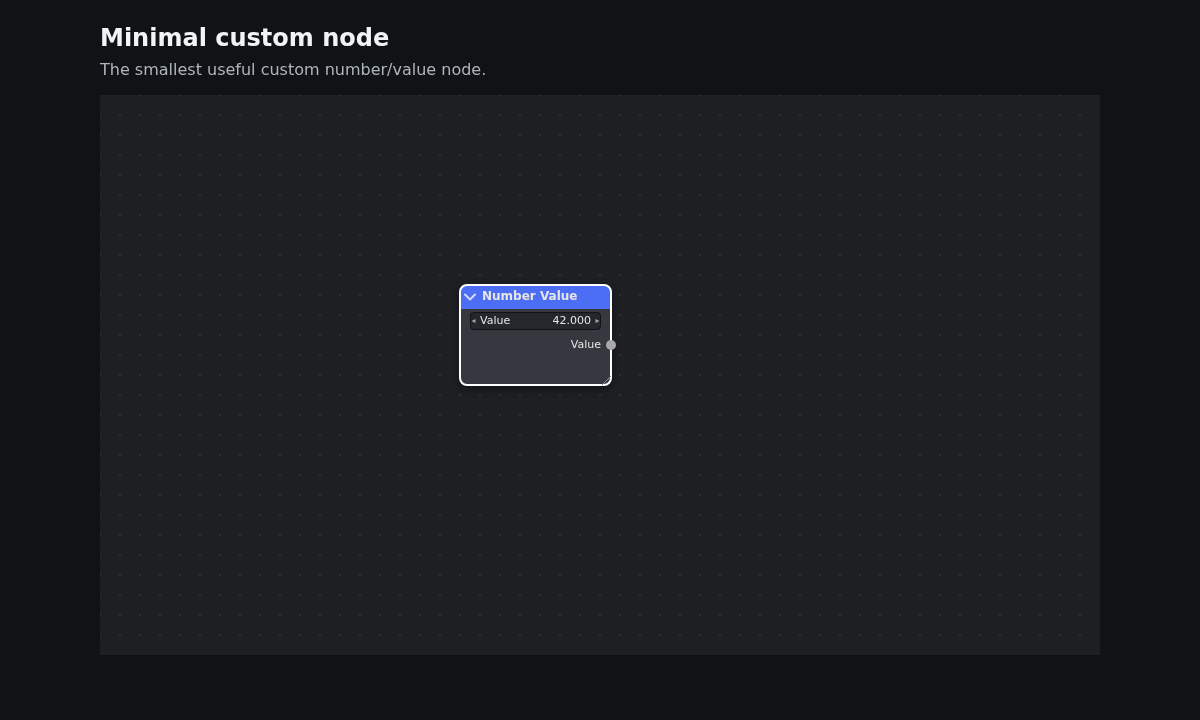
Complete sources: definition, bootstrap, and first-node tutorial.
One graph, zero or many views
createFxNode() creates the shared graph authority and starts one worker, but creates no canvas. This is valid for
headless browser workflows. Call attachView() whenever the application needs a presentation. Each view has its own
canvas, viewport, camera, selection, input stream, host requests, render barriers, and lifecycle; graph state,
composition, versions, events, persistence, and undo/redo remain shared on the root.
All views render through one worker-owned atlas canvas and one 2D rendering context. Each HTML canvas keeps its own
presentation context. FXNODE_VIEW_LIMITS.maxViews is a resource bound, not a count of worker rendering contexts.
const left = await api.attachView({
  canvas: leftCanvas,
  viewport: leftViewport,
  initialCamera: { center: { x: 480, y: -550 }, zoom: 0.5 },
});
const right = await api.attachView({
  canvas: rightCanvas,
  viewport: rightViewport,
  initialCamera: { center: { x: 2080, y: -400 }, zoom: 0.45 },
});

left.feedInput(pointerInputFromLeftCanvas);
await left.addNode({ typeId: "fxnode.shader.noise-texture", viewPosition: { x: 400, y: 260 } });
await Promise.all([left.whenRendered(), right.whenRendered()]);

await Promise.all([left.detach(), right.detach()]);
api.destroy();
View-local addNode, removeSelected, and setSelectedMuted use that view's camera and selection. Root-level
dispatch, undo, and redo are useful when no view context is required. A canvas can belong to only one live view.
The application must detach its view before reusing that canvas.
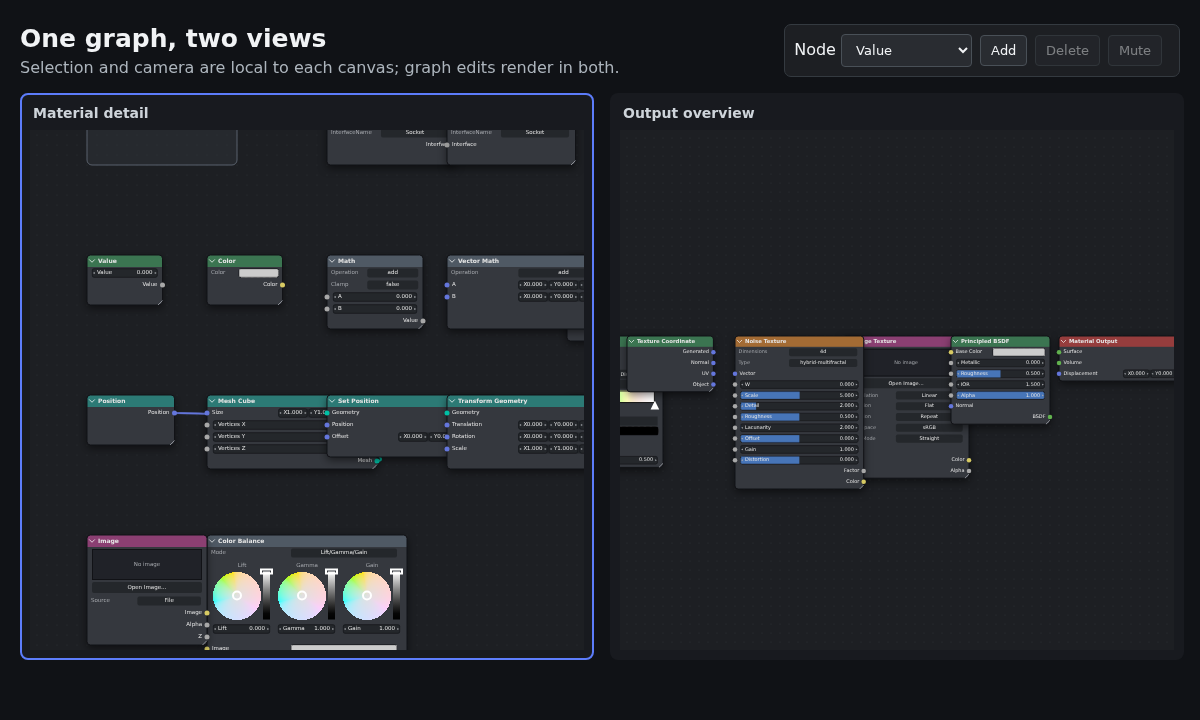
The multi-view example uses a single DOM toolbar to target whichever canvas was most recently activated. Its canvases forward pointer events only; menus, controls, resize observation, and teardown remain application code.
Focused example: Color Balance
The Color Balance example keeps strict local socket tuples and styles, then composes its larger node definition:
import type { FxNode, FxNodeSocketTypeDefinition, FxNodeStyleDefinition } from "fxnode";
import { colorBalanceNode } from "./color-balance.js";
import { exampleTheme } from "./theme.js";

const floatSocket = [
  "float",
  { title: "Float", color: "#a8a8a8", acceptsFrom: ["float"] },
] as const satisfies readonly [string, FxNodeSocketTypeDefinition];
const colorSocket = [
  "color",
  { title: "Color", color: "#d7ca63", acceptsFrom: ["color"] },
] as const satisfies readonly [string, FxNodeSocketTypeDefinition];
const styles = {
  compositorColor: { header: "#8c5cc4" },
} as const satisfies Readonly<Record<string, FxNodeStyleDefinition>>;

async function installColorBalance(api: FxNode) {
  await api.setTheme(exampleTheme);
  await api.setHeaderStyles(styles);
  await api.composeSocket(...floatSocket);
  await api.composeSocket(...colorSocket);
  await api.composeNode(...colorBalanceNode);
}
The node's UI schema includes a representative grading-wheels row:
import type { FxNodeDefinition } from "fxnode";

const gradingWheelsRow = {
  kind: "widget",
  widget: "grading-wheels",
  bindings: [
    { title: "Lift", scalar: "lift", color: "liftColor" },
    { title: "Gamma", scalar: "gamma", color: "gammaColor" },
    { title: "Gain", scalar: "gain", color: "gainColor" },
  ],
  visibleWhen: { parameter: "mode", equals: "Lift/Gamma/Gain" },
} satisfies FxNodeDefinition["ui"][number];
See the complete bootstrap, definition, and tutorial. This schema renders controls and connections; it does not evaluate the graph or process pixels.
Application-owned browser host
fxnode deliberately does not install global listeners or create application UI. A compact host should:
- measure and DPR-size the canvas, observe resize, and call
setViewport; - translate pointer, wheel, keyboard, focus, and outside-pointer events into
feedInput; - manage pointer capture, focus, context menus, add-node UI, and authorized resource pickers;
- subscribe to bounded host projections/requests and provide an accessible DOM workflow; and
- remove listeners, subscriptions, observers, temporary DOM, and captures during teardown.
The example host defaults to explicit lifecycle ownership. Its opt-in lifecycle: "detach-on-disconnect" policy
uses a document-level observer to tear down host policy and detach the view after a canvas remains disconnected for a
microtask; same-task moves are preserved. host.destroy() itself never detaches the view.
The host receives both the shared FxNode root and one FxNodeView. Route graph subscriptions and composition calls
to the root; route canvas input, viewport updates, selection actions, host requests, resources, and rendering to the
view. For multiple canvases, create one host (or equivalent listener owner) per view.
Use the browser-host guide, interaction guide, and the repository's compact host implementation.
State, persistence, and events
The worker is authoritative. All calls are asynchronous unless their signature says otherwise.
| API | Meaning |
|---|---|
getState() |
Detached, readonly current graph snapshot with graph version; does not mutate runtime state. |
setState(value) |
Validates and atomically replaces graph state; supports optimistic expectedVersion. |
save() |
Canonical current GraphLayoutV2; a compact graph export, not command history. |
getSaveData() |
Durable envelope: canonical baseline, applied journal, and effective save-time composition. |
load(value) |
Atomically validates/loads durable data; failure preserves current state. |
Committed graph changes publish mutations before snapshots in version order. onMutations and onSnapshots
do not mutate state; each returns an unsubscribe function, and subscriber failures are isolated. Composition has a
separate revision domain and onCompositionChanges; a rebind that changes the graph publishes its composition event
before the corresponding mutation and snapshot. Read graph state and events
and state and persistence.
Headless use
fxnode/headless exposes the same composition-bound document and command authority without browser or worker
resources. With the minimal tuples above:
import { createFxNodeHeadless } from "fxnode/headless";
import { exampleTheme } from "./theme.js";

const runtime = createFxNodeHeadless({
  schemaVersion: 2,
  id: "fxnode.example.minimal",
  version: 1,
  compatibility: { wildcardInputTypes: [] },
  theme: exampleTheme,
  socketTypes: { [numberSocket[0]]: numberSocket[1] },
  nodeStyles: minimalStyles,
  resources: {},
  nodes: { [valueNode[0]]: valueNode[1] },
} as const);

const empty = runtime.emptyDocument("minimal");
const document = {
  ...empty,
  nodes: { value: runtime.materializeNode("value", valueNode[0], { x: 360, y: 190 }) },
};
const issues = runtime.validateDocument(document);
if (issues.length) throw new Error(issues.map((issue) => issue.message).join("; "));
const layout = runtime.save(document);
Headless operations are explicit and immutable; they still edit graph documents and never evaluate them.
Documentation
- Learn: tutorials, concepts, integration guides, and examples
- Concepts: worker authority, composition, state, and persistence
- Guides: browser hosting, lifecycle, accessibility, CSP, and support
- Tutorials: minimal, Color Balance, and live composition
- API reference landing page
- Research notes and architecture decision
Development
Requires Node.js 20 or newer.
npm install
npm run typecheck             # TypeScript checks
npm test                      # Node test suite
npm run build                 # Vite library build + declarations
npm run examples              # Example gallery development server
npm run test:examples:visual  # Example screenshot checks
npm run docs:dev              # Generated API + VitePress development server
npm run docs:build            # Build generated API and documentation
npm run format:check          # Prettier verification
npm run release:check         # Full release gate (maintainers)
For contribution context, start with the executable examples and committed Learn landing page. The MIT license is in LICENSE; notices are in NOTICE.md.